
What is Enterprise Asset Management (EAM)?
From CMMS to SCADA to EAM: The Next Evolution in Asset Management
A complete guide to managing the full lifecycle of your physical assets, from acquisition to retirement, while reducing downtime, improving safety, and maximizing ROI.
Enterprise Asset Management (EAM) is the next step for companies that want more control over their equipment and operations. While CMMS tools help track maintenance, SCADA systems collect real-time equipment data, and APM platforms focus on asset performance and predictive insights, EAM brings everything together. It gives teams the tools to plan smarter, stay compliant, and keep assets running efficiently from day one through end of life
Enterprise Asset Management (EAM) defined
What does EAM mean?
Enterprise Asset Management, or EAM, is a type of software that helps companies keep track of and take care of their physical assets (things like equipment, machines, tools, and buildings). It manages everything from the moment an asset is purchased to when it’s replaced or retired. This includes planning, using, fixing, and improving those assets over time.
While many companies use a CMMS (Computerized Maintenance Management System) to schedule repairs and track work orders, EAM software goes further. It’s not just about fixing things when they break, but about making smarter decisions using real-time data and planning tools. EAM systems give companies a full picture of their operations, helping them reduce downtime, extend the life of their assets, and stay on budget.
EAM is used in many industries that rely on complex equipment and large facilities, including:
By using an EAM software, teams can make better choices based on real data and not guesswork. It helps leaders, maintenance teams, and asset managers work together more efficiently, so that businesses can stay productive, safe, and ready for what’s next.
Why EAM is a strategic advantage
Smarter asset decisions means stronger operations
Enterprise Asset Management (EAM) software does more than just support maintenance. It helps your team work smarter by improving how you manage your equipment, data, and decisions. Here's how EAM gives your business a real advantage:
Extend equipment life
EAM helps you take better care of your assets with on-time maintenance and clear schedules. That means equipment lasts longer and performs more reliably.

Reduce downtime and costly failures

Unplanned breakdowns can be expensive. EAM software connects sensor, SCADA, and IoT signals to maintenance workflows, helping teams catch issues earlier and automatically create, route, and track work orders when action is needed.
Improve compliance and lower risk
EAM systems make it easier to stay compliant. They track inspections, safety tasks, and documentation, helping you meet industry standards and avoid penalties.

Make better budget and planning decicions
With clear data on how assets are performing and what they cost to maintain, you can plan budgets and capital projects more accurately. Fewer surprises, better forecasting.

EAM replaces spreadsheets and disconnected tools with one system that manages it all. Maintenance schedules, asset details, parts inventory, and team activity are connected and easy to access.

Bring everything into one place
Industries like manufacturing, food and beverage, energy, and facility management are already seeing the difference. With EAM, teams can move from reacting to problems to preventing them and from siloed operations to shared visibility.

The measurable impact of EAM
30%
fewer equipment breakdowns
15-20%
drop in maintenance costs
20%
increase in asset availability
10%
boost in mechanical efficiency
Source: BEMAS Maintenance Performance Indicator Survey 2023
Comparing EAM, CMMS, APM, and SCADA
What’s the difference between EAM, CMMS, APM, and SCADA?
Enterprise Asset Management (EAM), Computerized Maintenance Management Systems (CMMS), Asset Performance Management (APM), and Supervisory Control and Data Acquisition (SCADA) systems are all used to support equipment and operations. However, each one serves a different purpose.
Understanding how these systems work and where they overlap can help you choose the right tools for your organization.
CMMS
A CMMS helps with day-to-day maintenance. It’s used to schedule work orders, track repairs, and make sure maintenance tasks get done on time.
APM
APM is used for monitoring how assets are performing. It often connects to sensors and IoT data to predict problems before they happen and improve asset reliability.
SCADA
SCADA systems monitor and control equipment in real time. They collect data from sensors and connected equipment, often as part of a broader industrial IoT environment. SCADA can trigger alerts and automate processes, but it typically does not manage long-term asset history or maintenance execution.
EAM
EAM covers the full lifecycle of physical assets. It helps plan, maintain, and track equipment from purchase to retirement. EAM often works alongside CMMS, APM, and SCADA to centralize asset data and decisions.
| EAM | CMMS | APM | SCADA | |
|---|---|---|---|---|
| Asset lifecycle management | ✓ | X | X | X |
| Maintenance scheduling | ✓ | ✓ | ~ | X |
| Work order management | ✓ | ✓ | X | X |
| Performance monitoring | ✓ | X | ✓ | ✓ |
| IoT & data integrations | ✓ | ~ | ✓ | ✓ |
| Reporting & analytics | ✓ | ✓ | ✓ | ~ |
| Mobile access / field tools | ✓ | ✓ | ~ | X |
| Capital project planning | ✓ | X | X | X |
Want to dive deeper into how these tools compare?
CMMS vs. EAM: Understanding Asset Maintenance Management Solutions
The choice between CMMS and EAM depends on several factors, including the scale of operations, the size of the asset portfolio and the company’s specific objectives.

Peak Performance in Utilities: Explore the Power of CMMS and EAM
Efficiently managing assets in the utility industry is complex, whether you are responsible for power generation, water treatment, or other utility services.

What’s the difference between EAM and ERP?
Why ERP isn’t built to manage your physical assets
Enterprise Resource Planning (ERP) systems like Microsoft Dynamics 365 Business Central are designed to manage core business functions such as finance, HR, procurement, and inventory. However, when it comes to managing physical assets like equipment, machinery, and infrastructure, they often fall short.
Enterprise Asset Management (EAM) systems are built specifically for tracking and supporting the full lifecycle of physical assets. They include tools for scheduling maintenance, monitoring asset condition, managing spare parts, and supporting technicians in the field. These capabilities are limited or missing in most ERP platforms.
Using an EAM system alongside your ERP gives you a clearer view of both asset performance and business operations. This leads to better planning, less downtime, and more efficient use of resources.
| EAM | ERP | |
|---|---|---|
| Asset lifecycle management | ✓ | ~ |
| Financial management | × | ✓ |
| Maintenance planning & scheduling | ✓ | × |
| Procurement & purchasing | ~ | ✓ |
| Work order management | ✓ | × |
| Spare parts & inventory tracking | ✓ | ~ |
| HR & workforce management | ~ | ✓ |
| Mobile field access | ✓ | × |
| Condition monitoring & IoT data | ✓ | × |
| Capital project planning | ✓ | × |
| Compliance tracking & safety logs | ✓ | × |
| Cross-department reporting | ~ | ✓ |
| Reporting (Power BI integration) | ✓ | ✓ |
EAM vs ERP
ERP platforms are excellent for tracking business processes, but they aren’t designed for day-to-day asset care or long-term planning. An EAM gives you the tools to manage assets, reduce downtime, and improve decision-making across your operations.
Who uses an EAM system?
From the shop floor to the front office
Enterprise Asset Management software supports more than just maintenance teams. It connects people across departments and job levels, helping everyone stay aligned, informed, and efficient.
Here’s how different roles benefit from using an EAM:
Field technician
Access work orders, update job status, and log inspections using mobile tools.
Maintenance manager
Plan preventive maintenance, assign tasks, and track asset health.
Operations director
Monitor performance and downtime trends to support decision-making.
Finance team
Use asset data to forecast costs, plan budgets, and support capital investment strategies.
Procurement team
Manage spare parts inventory and coordinate purchasing based on actual usage.
IT and systems administrator
Manage integrations, support user access and security, and ensure the system scales their organization’s needs.
HR and safety team
Track training certifications, incident reports, and compliance-related tasks.
External vendor
Receive assigned work, upload service records, and stay connected without needing direct access to ERP systems.
Key features of an EAM software
What to look for in a complete enterprise asset management system
Not all EAM software is built the same. The best systems offer a wide range of features that help you manage assets efficiently, reduce downtime, and stay on top of compliance and planning. Here are some of the key capabilities to look for:
Does it offer offline mobile access?
Field teams need to stay productive, even without a strong internet connection. Look for a system that supports mobile use in remote or low-connectivity environments.
Can it integrate with my ERP or CMMS?
If you’re using tools like Microsoft Dynamics 365 Business Central or a CMMS, integration is essential. It ensures your systems can share data and work together without duplication or delays.
Is reporting customizable?
Different teams need different insights. Choose an EAM system that lets you create dashboards and reports tailored to your business goals.
Can I monitor assets in real time?
Real-time visibility helps you respond faster to issues, track performance trends, and improve planning. Sensor and IoT support are major pluses.
Can my team be onboarded quickly?
A system is only useful if your people can use it. Look for platforms with intuitive interfaces, mobile-friendly design, and training support to get your teams up to speed fast.
Choosing the right EAM software
A few key questions to ask before you decide
Not every Enterprise Asset Management system will meet your organization's needs. Before you choose a platform, it’s important to look beyond the basics and think about how it will work in the real world with your people, your processes, and your data.
Use this checklist to guide your evaluation:
Asset registry and hierarchy
A strong EAM system lets you organize your assets into clear structures — by location, type, system, or process — so nothing gets lost or overlooked.
Full asset lifecycle management
From purchase and installation to replacement or retirement, EAM software tracks the entire life of each asset. This helps with long-term planning and budgeting.
Preventive and predictive maintenance
You can schedule maintenance before problems happen, and even use SCADA data from IoT sensors or inspections to catch issues early. This reduces unplanned downtime and costly repairs.
Work order management
Easily assign, track, and complete maintenance tasks. Field teams can update work orders in real time and attach notes, photos, or safety checks.
Inventory and parts tracking
Know what parts you have, where they are, and when to restock. EAM software connects your spare parts inventory to your maintenance plans.
Health and safety compliance
Log inspections, track incidents, and manage compliance requirements with tools that help reduce risk and keep teams safe.
Reporting and analytics
Get clear insights into asset performance, maintenance history, and team productivity. Many systems also integrate with tools like Power BI for custom dashboards.
GIS integration
Map-based asset views help you manage infrastructure across large areas, like facilities, utilities, or city-wide systems.
ERP integration
When EAM connects with your ERP system, data flows smoothly between finance, operations, and maintenance. This creates a single source of truth for planning and performance.
Learn how to build an effective preventive maintenance strategy
Crush downtime with a 14-step preventive strategy
Expert tips for getting the most out of your maintenance plan
Learn best practices directly from industry experts

Why The Asset Guardian (TAG) Mobi
Built for modern teams and integrated for modern systems
After learning what to look for in an EAM solution, you’ll likely recognize that many of those must-have features come standard with The Asset Guardian (TAG) Mobi. It’s an Enterprise Asset Management solution that’s built to work with the tools you already use — and scale with you as your operations grow.
Here’s what sets TAG apart:
Embedded in Microsoft Dynamics 365 Business Central
Built natively inside MBC, so data flows easily between departments, with no duplicate systems or manual workarounds.
Full asset lifecycle management
Track assets from acquisition to retirement, including usage, condition, cost, and performance.
Preventive and predictive maintenance
Schedule routine work and monitor real-time data to catch issues before they cause unplanned downtime.
Work order management
Create, assign, and complete tasks efficiently — in the office or in the field.
Inventory and parts management
Stay on top of parts usage, stock levels, and reorder points across multiple locations.
Mobile and remote access
Teams can view and update asset data from any device, even without a network connection.
Advanced analytics and reporting
Use built-in insights or connect directly with Power BI for dashboards that match your KPIs.
Scalable for growing asset portfolios
Whether you manage one facility or dozens, TAG grows with you without adding complexity.
IoT, SCADA, and real-time monitoring
Connect sensor and SCADA data to assets, reduce aelert noise, detect issues earlier, and turn meaningful signals into work orders.
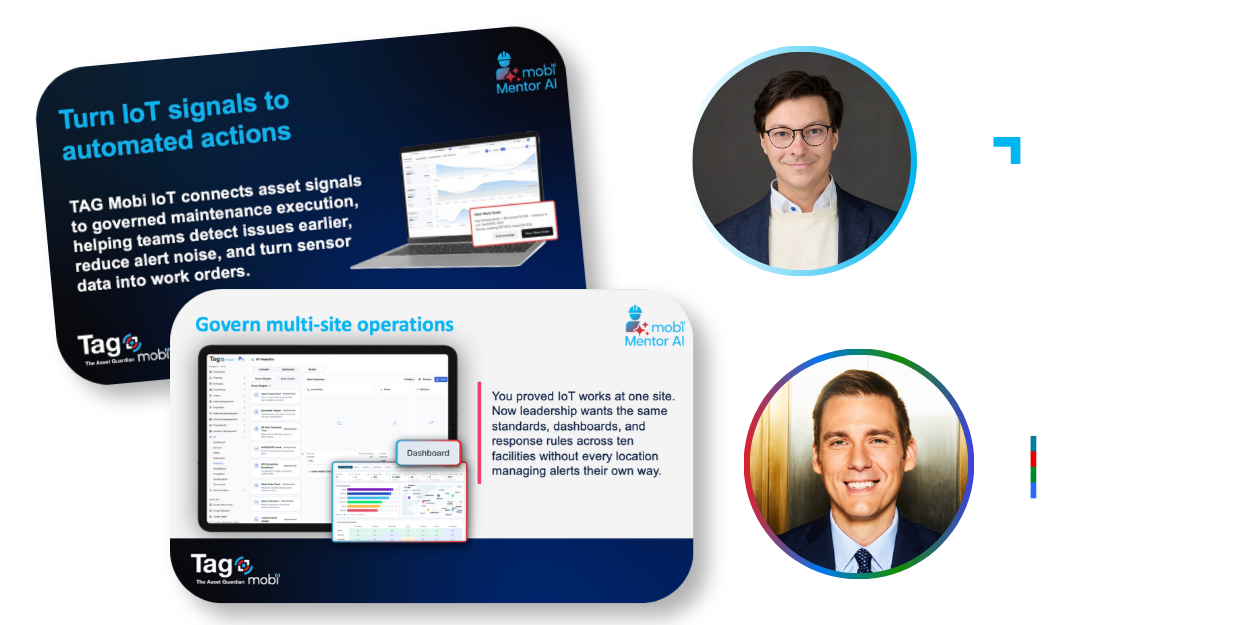
From IoT Alert to Action: How Renewable Energy Operators Are Closing the Maintenance Gap
"You have the IoT. You installed it. You've been investing in it. What you don't have is an automated path from alert to action, and you don't have an easy way to measure the financial impact of that action. TAG Mobi closes both gaps—the operational one and the financial one—through one closed loop embedded in Business Central."
- Paul Gerke, Content Director at Factor This
Want to learn how predictive maintenance can reduce downtime?
How to Use Predictive Maintenance to Protect Renewable Energy Assets
Use predictive maintenance to detect renewable asset issues early and turn IoT and SCADA data into work orders.

Verosoft Launches TAG Mobi IoT: Asset Signals to Maintenance Action
Verosoft launches TAG Mobi IoT to turn asset signals into work orders, reduce alert noise, and help prevent downtime.


“Before implementing the EAM system, we were not able to monitor downtime accurately. We had two different systems to separately monitor work orders and inventory. Now, with The Asset Guardian, we see what our downtime is and can reduce it efficiently.”
Kendrick Horkley
Project Lead at Ready Foods

Unlock AI built for maintenance
Reduce admin, increase wrench time

Let AI handle data entry, forms, and reports so your team spends more time fixing and less time typing.
Scale expertise at a lower cost

Capture and share expert knowledge with AI-guided insights and contextual recommendations.
Streamline complex workflows

Automate scheduling, preventive maintenance planning, and auditing with reliable, purpose-driven AI agents.