
What is Predictive Maintenance?
How IoT Helps Reduce Downtime and Detect Issues Earlier
Predictive maintenance uses asset data, equipment condition, and IoT sensors to help maintenance teams identify issues before they lead to failure. Learn how it works, how it compares to other types of maintenance, and how connected asset data can support better planning, fewer breakdowns, and more reliable operations.
Understanding predictive maintenance
Predictive maintenance is a maintenance strategy that uses asset data to detect equipment issues before they lead to failure. Instead of waiting for equipment to break down or servicing assets only on a fixed schedule, teams use equipment condition to understand when maintenance is actually needed. Over time, this helps teams improve asset reliability by identifying recurring issues, reducing unexpected failures, and making maintenance decisions based on actual condition.
IoT plays an important role by collecting real-time or near real-time data from connected sensors. This can include vibration, temperature, pressure, flow, current, voltage, energy consumption, runtime, and other operating conditions. When this data is connected to the right asset and maintenance process, teams can identify early warning signs and act before small issues become costly failures.
For asset-intensive organizations in manufacturing, energy and renewables, mining, utilities, and facility management, predictive maintenance helps reduce the impact of downtime on productivity, service delivery, safety, and operating costs.
| Maintenance strategy | What triggers the work | Uses real-time asset data | Helps prevent failure | Best used for | Main limitation |
|---|---|---|---|---|---|
| Reactive maintenance | Equipment has already failed | ✕ | ✕ | Low-cost, low-risk assets where downtime has limited impact | Can lead to unplanned downtime, emergency repairs, and higher disruption |
| Preventive maintenance | A fixed time, usage, or service interval | ✕ | ✓ | Routine tasks, compliance needs, and known maintenance cycles | Can lead to over-maintenance or miss issues between scheduled work |
| Condition-based maintenance | A measured condition crosses a defined threshold | ✓ | ✓ | Assets where specific limits can indicate wear, overheating, pressure loss, vibration, or other risk | Depends on clear thresholds and can miss more complex failure patterns |
| Predictive maintenance | Asset condition, sensor data, trends, and analytics indicate future risk | ✓ | ✓ | Critical assets where early detection can reduce downtime, cost, and operational disruption | Requires reliable data, connected workflows, and ongoing tuning |
Reactive maintenance
Preventive maintenance
Condition-based maintenance
Predictive maintenance
Maintenance strategies compared: reactive, preventive, condition-based, and predictive
Maintenance teams often use more than one maintenance strategy. The right approach depends on asset criticality, failure risk, available data, and the cost of downtime. Reactive, preventive, condition-based, and predictive maintenance each trigger work in a different way.
In practice, these strategies often work together. Reactive maintenance may still be acceptable for simple, low-risk assets. Preventive maintenance creates structure for routine service. Condition-based maintenance helps teams act when asset conditions move outside acceptable limits. Predictive maintenance goes further by using equipment data, trends, and analytics to detect risk earlier and support better maintenance planning.
For asset-intensive teams, the goal is not to replace every maintenance strategy with predictive maintenance. The goal is to apply the right strategy to the right asset, based on risk, cost, criticality, and available data.
How IoT supports predictive maintenance
IoT supports predictive maintenance by collecting equipment data through connected sensors and devices. These sensors monitor asset conditions and send data to a system where it can be analyzed, compared against normal performance, and used to trigger maintenance action. Common IoT sensor data for predictive maintenance includes:
vibration
temperature
pressure
humidity
flow
current
voltage
energy consumption
runtime
speed
cycle count
fluid levels
environmental conditions
This data gives maintenance teams a clearer view of how assets are performing. Instead of relying only on manual inspections or fixed maintenance intervals, teams can monitor actual operating conditions and identify early signs of equipment degradation. A basic IoT predictive maintenance workflow often looks like this:
Sensors collect data from equipment
1
The data is sent to a connected system
2
Rules, thresholds, analytics, or AI identify abnormal behavior
3
Sensors collect data from equipment
4
The data is sent to a connected system
5
Rules, thresholds, analytics, or AI identify abnormal behavior
6
The value of IoT is not simply collecting more data. The value comes from helping teams act on the right signals at the right time.
On-Demand Webinar
Business Central + IoT Automation: How IoT Monitoring Supercharges BC for Manufacturing and Facility Management

The industrial IoT market is growing from $24B in 2025 to $138B by 2031, and many deployments stall at monitoring. In this live session, discover how Microsoft partners can turn industrial IoT data into actionable workflows and recurring service revenue opportunities using Business Central.
Why predictive maintenance changes the way teams plan work
IoT sensors and asset data can reveal warning signs before equipment fails. This gives teams more time to investigate, plan, and act before a small issue becomes a larger outage.
Detect issues earlier
IoT sensors and asset data can reveal warning signs before equipment fails. This gives teams more time to investigate, plan, and act before a small issue becomes a larger outage.
Plan maintenance with better timing
Predictive maintenance helps teams schedule work based on actual asset condition. This can reduce unnecessary maintenance while making it easier to prioritize assets that need attention.
Reduce emergency repairs
When teams detect issues earlier, they can reduce urgent repairs that disrupt schedules, increase costs, and create operational pressure.
Use labor and parts more effectively
Predictive maintenance gives teams more time to plan technician availability, order parts, and coordinate work. This helps reduce rushed decisions and last-minute purchasing.
Improve asset reliability
By tracking condition data and maintenance outcomes over time, organizations can better understand which assets are at risk, which failure patterns are recurring, and where reliability improvements are needed.
Support better decisions
Predictive maintenance connects asset performance to maintenance action. This gives operations, maintenance, and leadership teams clearer information when deciding whether to repair, replace, inspect, or monitor equipment.
How predictive maintenance supports asset reliability
Predictive maintenance supports asset reliability by helping teams detect early warning signs, understand recurring failure patterns, and plan maintenance before equipment issues disrupt operations. When IoT sensor data is connected to maintenance history and work orders, teams can see not only what is happening to an asset, but also what actions were taken and whether those actions reduced future risk.
This gives maintenance and reliability teams a better foundation for improving uptime, reducing repeat failures, and making long-term repair-or-replace decisions.

The measurable impact of predictive maintenance
25%
increase in productivity
70%
fewer equipment breakdowns
25%
lower maintenance costs
8–12%
savings over preventive maintenance alone
Source: U.S. Department of Energy; Deloitte
Who gains the most from predictive maintenance?
Predictive maintenance is most valuable for organizations that rely on critical equipment, distributed assets, or operations where downtime is expensive.
Manufacturing
Manufacturers use predictive maintenance to reduce production stoppages, improve OEE, and monitor equipment such as motors, conveyors, compressors, robotics, production lines, and packaging systems.
Renewable energy
Energy teams use predictive maintenance to monitor distributed assets such as inverters, transformers, wind turbines, battery energy storage systems, and solar equipment. This can help reduce unnecessary site visits, detect performance issues earlier, and improve uptime across remote locations.
Facility management
Facilities teams use predictive maintenance to monitor HVAC systems, pumps, generators, electrical systems, elevators, and building equipment. This helps reduce emergency service calls and improve comfort, safety, and continuity.
Mining and heavy industries
Mining and heavy industrial operations use predictive maintenance to monitor equipment working in demanding environments, including conveyors, crushers, pumps, motors, haulage equipment, and processing systems.
Maintenance and reliability teams
Maintenance and reliability leaders benefit from predictive maintenance because it helps them prioritize work, reduce reactive maintenance, and make decisions based on asset condition instead of assumptions.
Operations leaders
Operations leaders benefit because predictive maintenance supports uptime, productivity, cost control, and better planning across sites or production environments.
Want to compare maintenance strategies in more detail?
Creating an Effective Preventive Maintenance Plan: What You Need to Know
Learn how to build a preventive maintenance plan and reduce equipment failure using EAM software.

Verosoft Launches TAG Mobi IoT: Asset Signals to Maintenance Action
Verosoft launches TAG Mobi IoT to turn asset signals into work orders, reduce alert noise, and help prevent downtime.

What to look for in predictive maintenance software
The right predictive maintenance software should help maintenance and reliability teams move from equipment data to maintenance action. The right solution should connect asset condition, IoT sensor data, alerts, and maintenance workflows so teams can identify risk and act before equipment failure occurs.
When evaluating predictive maintenance software, look for features that support both detection and execution. A system may provide useful dashboards, but if it does not help teams prioritize issues, assign work, and track outcomes, it may be difficult to turn predictive insights into measurable maintenance improvements.
| What to look for | Why it matters |
|---|---|
| IoT sensor data integration | Connects equipment data such as vibration, temperature, pressure, current, voltage, runtime, and energy consumption to the maintenance process. |
| Asset mapping | Links sensor signals to the correct asset, location, system, and maintenance history so teams have the context needed to act. |
| Rules and thresholds | Helps teams define when equipment behaviour should trigger an alert, inspection, request, or work order. |
| Anomaly detection | Identifies unusual patterns that may not be obvious through fixed thresholds alone. |
| Alert prioritization | Helps reduce alert noise so teams can focus on the signals that matter most. |
| Work order or maintenance workflow integration | Turns asset insights into assigned, trackable maintenance work instead of leaving issues in a dashboard. |
| Reporting and dashboards | Gives maintenance, reliability, and operations teams visibility into asset health, downtime trends, recurring issues, and completed work. |
| Multi-site visibility | Supports consistent processes, shared standards, and performance tracking across multiple facilities or locations. |
| Ease of use | Makes predictive maintenance practical for maintenance managers, technicians, reliability teams, and operations leaders. |
| Continuous improvement tools | Helps teams review alerts, outcomes, false positives, recurring failures, and rule performance over time. |
IoT sensor data integration
Asset mapping
Rules and thresholds
Anomaly detection
Alert prioritization
Work order or maintenance workflow integration
Reporting and dashboards
Multi-site visibility
Ease of use
Continuous improvement tools
A strong predictive maintenance solution should make it easier to answer practical questions: Which asset is showing signs of risk? How urgent is the issue? Who needs to act? What work was completed? Did the action prevent downtime or reduce future risk? The goal is to help teams move from asset data to better maintenance decisions.
Connect IoT signals to predictive maintenance workflows with TAG Mobi
TAG Mobi helps you turn sensor, SCADA, and equipment data into earlier maintenance action.
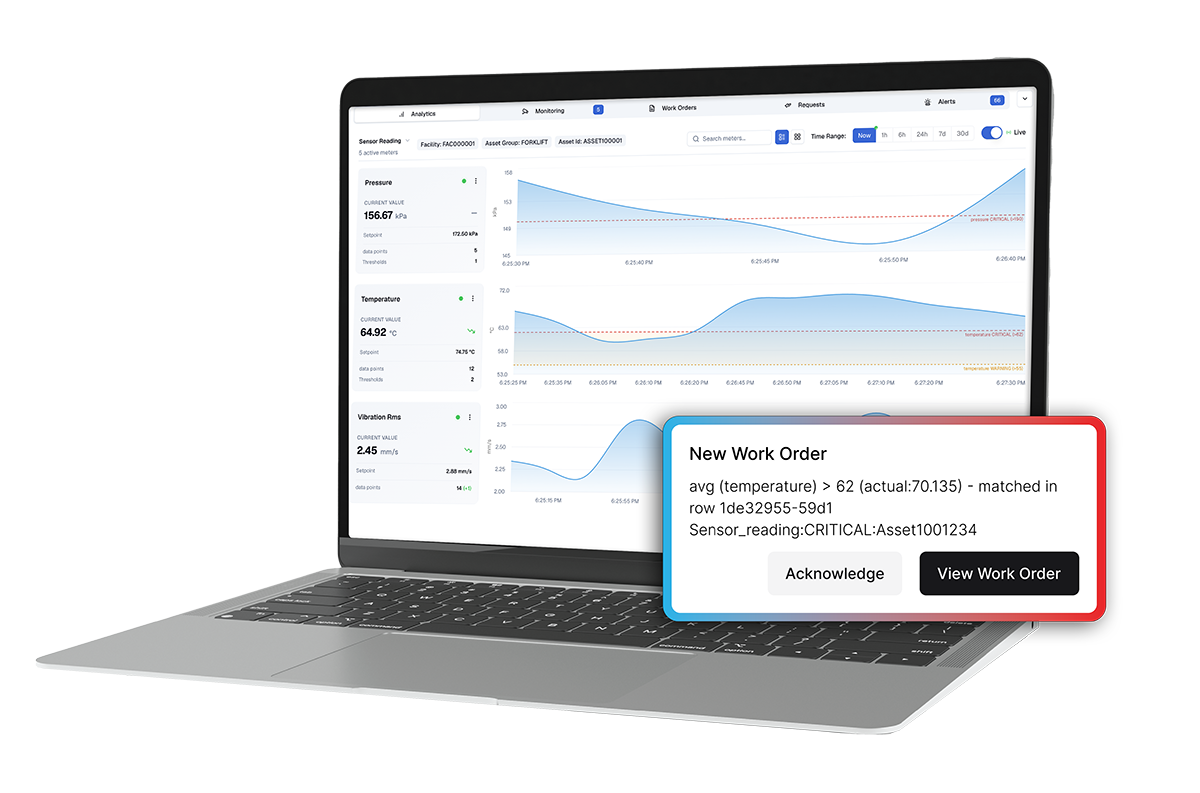
Monitor asset conditions using IoT, SCADA, and industrial control data
Detect abnormal behavior before it becomes downtime
Trigger work orders when asset signals require action
Reduce alert noise with escalation and suppression rules
Connect predictive maintenance activity to asset history, labor, parts, and cost